Why I threw out a perfectly good ad blocker to stand up a real DNS server.
Everyone with a homelab knows the feeling: you keep rebuilding things, not because you have to, but because you can do them better. The old setup runs, it did its job – and you rip it out anyway.
That is exactly what I did with AdGuard Home. For years it ran here as my DNS, dutifully blocked ads for us, showed a pretty dashboard and never caused any trouble. It got thrown out anyway. Replaced by Technitium as my DNS server.
To sum up the actual reason:
- AdGuard Home is an ad blocker that acts as a DNS server.
- Technitium is a DNS server where ad blocking is one feature among many.
And at some point my ambition for my network was to do it „properly“.
What I actually wanted
The real trigger will sound familiar to anyone running more than three services behind a reverse proxy at home.
I have my own domain for my homelab, with all hosted services running as subdomains. Photo management, media server, personal cloud, and so on. Publicly, the domain points to my external IP; internally, it should point to the reverse proxy on my home network. Same name, different answer depending on who is asking. That is called split-horizon DNS and it should be the normal case in a homelab.
The upside is not just speed (the traffic never even leaves the router and comes back). The more important reason: internal DNS keeps working even when the internet is down. Even if my provider has a bad day, I still want to reach my documents.
On top of that came the wish for reverse DNS. Every device on the network should not only have a name that points to an IP, but the other way around too: every IP should return a name. What is that good for? It means a monitoring dashboard shows something like datengrab or sonos-wohnzimmer instead of just IP addresses.
It also helps a lot to get the warning „drucker-johanna is down“ directly, instead of first looking up which IP belongs to which device.
And finally: a clean naming convention. Services under one scheme, devices under another.
Where AdGuard Home hits its limit
To be fair: you can do reverse DNS and split-horizon with AdGuard Home too, sort of. Its DNS rewrite rules let you fake individual PTR records, and with the $client modifier you can serve different answers depending on the requesting client. That is split-horizon by definition.
But the fundamental problem: AdGuard Home has no concept of a zone.
There is no zone. No SOA, no NS, no delegation, no zone transfer, no DNSSEC signing, no secondary zone, no zone file. Everything that looks like DNS in AdGuard is really a filter rule. You fake individual answers instead of running a zone.
This is not just my interpretation, it is the project’s stated position. The feature request „Add DNS zone via web interface“ has sat closed in the repo for years, with the maintainer’s reply that the DNS rewrites might be extended some day. But: „that’s a bit in the air right now“. And until then dnsrewrite is meant to stay the way. And: that is entirely legitimate. AdGuard Home defines itself as „network-wide software for blocking ads and tracking“ that operates as a DNS server. So it does exactly what it claims.
But I did want a bit more: if you have ten internal names, rewrite rules are fine. But building a wildcard zone, a separate device zone and two reverse zones with automatically maintained PTR records out of that does give you a headache…
Technitium as a switchboard
Technitium is a full DNS server: authoritative and recursive, with a web interface. It is licensed under the GPLv3 and is essentially developed by a single person (Shreyas Zare).
Why Technitium?
- Real zones. Primary, secondary, stub, conditional forwarder. With SOA, NS, delegation, zone transfer (AXFR/IXFR), NOTIFY and DNSSEC signing. Everything AdGuard cannot offer.
- Authoritative and recursive in one service. That is what makes it convenient for the homelab: you do not need Pi-hole for blocking and Unbound for recursion and something else for your own zones, just one service with one UI.
- Ad blocking is in there too. Block lists by URL, „Quick Add“ for the usual suspects. The „Advanced Blocking“ app can even use different block lists per client or subnet and blocks CNAME cloaking.
- Split-horizon. Via the Split Horizon app, mapping subnet → answer.
- DHCP with automatic DNS. The built-in DHCP server creates forward and reverse records automatically. You forget nothing, and reverse DNS „maintains itself“ instead of being forgotten as a „nice idea“ whenever a new service shows up.
- Self-hosted DoH/DoT/DoQ, not just as an upstream. Plus API, 2FA, DNSSEC validation and QNAME minimization.
The migration itself was refreshingly unspectacular: I put Technitium on the same IP and the same port as AdGuard before it. So I had to reconfigure exactly nothing on the router. For every device in the house, nothing changed at all.
The setup afterwards:
- One primary zone for my homelab domain, with a wildcard: everything that matches
*.my-domainlands at the reverse proxy. Meaning: new service = new proxy host. No more DNS entry needed. More comfort in daily life 😊 - A separate zone for devices, where hostnames point directly to their IPs.
- Two reverse zones for two different VLANs, with PTR records.
- And: no forwarders. More on that in a moment.
The naming convention that came out of this is simple enough to remember: service.my-domain always goes through the reverse proxy. device.internal.my-domain goes straight to the machine, no proxy in between. When I see a name, I know immediately which category it belongs to.
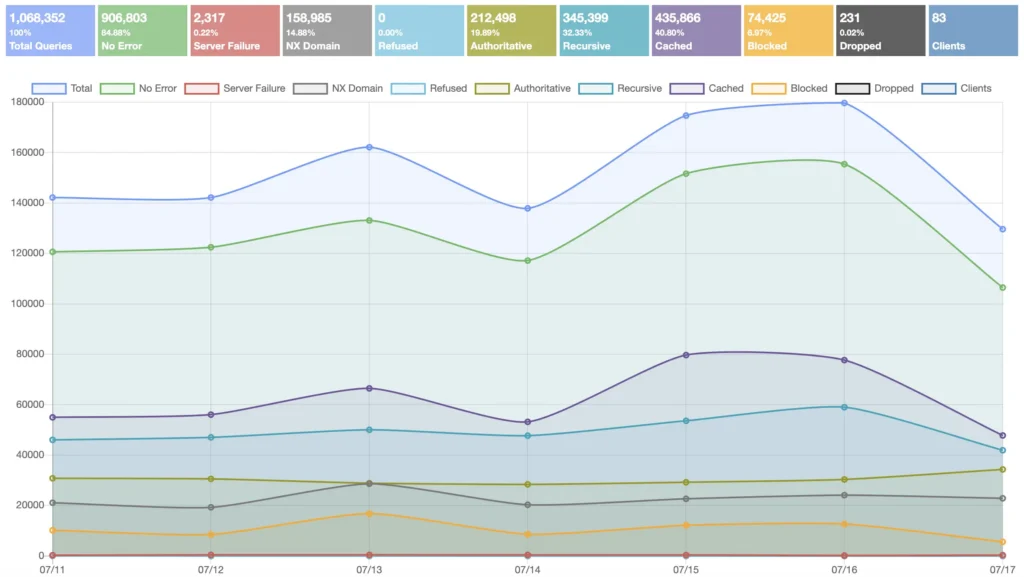
20% authoritative from my own zones, 32% resolved recursively, 7% blocked.“
No forwarders – and the trade-off
This is probably the part I went back and forth on the longest.
Normally the DNS server in your house asks one of the big providers (Cloudflare, Google, your ISP itself, …) and passes the answer along. That is called a forwarder.
The alternative is recursive resolution: the server works its way through on its own, from the root servers via the TLD servers down to the authoritative nameserver of the target domain. No third party in between.
The upside is privacy: no single provider sees my complete DNS history anymore. Google’s servers learn that I request something from Google, but not that I open my online banking or a news site right afterwards. With a forwarder the upstream knows everything.
The downside is speed, and you need to be aware of it: the first lookup of a domain under a previously unknown TLD can take up to a second, longer with DNSSEC. After that everything is in the cache and follow-up queries are under 0.1 seconds. The big providers keep basically everything common permanently cached, and an instance in your basement cannot compete with that.
The argument that „CDNs will hand you worse servers then“ (EDNS Client Subnet) applies much less to a resolver in your own house: the problem arises because the resolver sits far away from the client. Mine sits on the same network.
What you should keep on your radar, because it is nasty to debug: some ISPs and consumer routers intercept port 53 and redirect it, without any notice. Some CG-NAT setups let UDP through but then silently drop TCP on port 53, which you need for DNSSEC answers. If recursion behaves strangely, this might be exactly why.
Since I have fiber and simply do not notice the latency in daily use, the decision was easy(er) for me. But if you are on a slow line or have a house full of impatient people, you might weigh it differently. It is a trade-off, not a „right“ or „wrong“.
The downsides
- The docs have gaps. Split-horizon is one such case: it works, but the official documentation for it is simply missing. The developer admits this himself in the GitHub discussions. So you end up piecing it together from discussions and forum posts. With AdGuard Home the docs were noticeably rounder.
- Small project, big responsibility. Technitium depends (so far) very heavily on one person. That is not unusual for open source projects, but DNS is the service that pretty much everything in the house hangs on.
- A lot more concepts. Anyone who just wants to block ads gets zone management, zone types, TSIG keys and DNSSEC options they will probably never need. You cannot really blame Technitium for that, but it is of course overkill if you need or want none of it.
- The classic = SPoF: single point of failure. When DNS is down, everything is down, and in a particularly confusing way (nothing is „broken“, things just stop working). Technitium has the right tools for that case – secondary zones via AXFR with TSIG, plus catalog zones so you do not have to create new zones on every server individually, and by now also a clustering feature that syncs block lists and apps across multiple instances. I still run only one instance right now. That is a gap in my setup, and it is on the to-do list. (If you go the same route: clustering syncs the configuration, it is not failover and not a load balancer.)
A quick word on the alternatives (which I did not all look at in detail):
- Pi-hole is the classic and at its core the same principle as AdGuard Home: blocking via DNS. For zones and everything beyond, you slide dnsmasq configs underneath. That leaves you with two configuration layers, one of which does not show up in the UI. Not what I wanted.
- The classic combination Pi-hole + Unbound solves exactly my recursion wish, but only that. Zone management stays manual, and you run two services instead of one.
- BIND 9 is the reference, it can do everything I wanted, including real views for split-horizon. But configuration is exclusively via
named.conf, no GUI and no ad blocking. Not a fit for me.

- Blocky looks great for the most part: a single Go binary, YAML configuration, block lists per client group, Prometheus metrics. Awesome if you want everything as code. Just no authoritative DNS → so it cannot assign and answer the names for my own network itself.
- dnsmasq and CoreDNS are both excellent, but each in its own niche. dnsmasq is the lightweight classic on routers and embedded systems, combining DNS forwarding, caching and DHCP in one small package, but it does not want to be a full authoritative server either. CoreDNS is the plugin-based standard DNS from the Kubernetes world, but you would have to assemble a lot yourself, without a GUI and without ad blocking.
Update
What about DoH/DoT?
After the original German version of this post went out, a fair objection came up in the Fediverse: with recursion my queries go out to the authoritative servers in the clear, unencrypted on port 53.
True, and not pretty. But DoH/DoT to a provider only encrypts the last mile, while handing my complete query history to that one provider, whereas with recursive resolution (plus QNAME minimization) no single party sees everything. To me those are two different threat models.
If you weight the encrypted last mile higher, Pi-hole plus dnscrypt-proxy with a DoH upstream is exactly right. For myself I put “no central observer” above “encrypted last mile” (among other things because my ISP sees my destination IPs anyway), but both are legitimate.
Conclusion
Was this strictly necessary? Nope. AdGuard Home would have kept doing its job, and for most people it is probably the right choice: simpler, better documented, does what it should.
But the switch pays off once you notice you are starting to rebuild DNS concepts out of filter rules. If you are bending a handful of internal names: stick with AdGuard or Pi-hole. But once you start cobbling together wildcards, reverse zones and split-horizon, you are fighting the tool, and you are better off switching tools.
The nicest part of the new setup is not even the zone stuff, but a small detail: I create a new service, add it to the reverse proxy, and the wildcard zone has already taken care of the rest. No DNS entry, no follow-up work. And in monitoring there are names instead of numbers, because the DHCP server maintains the PTR records on its own.
Takeaway:
An ad blocker that speaks DNS is something different from a DNS server that can also block ads. You only notice the difference once you want more than just blocking – but then you notice it immediately.
Update · August 24, 2026
The secondary is up.
The gap mentioned above („I still run only one instance right now“) is closed: there is now a second Technitium on a second host, with secondary zones via AXFR and TSIG. How it is put together, which trap nearly broke my split-horizon along the way, and why I deliberately skip a shared virtual IP, all of that is in the follow-up post: Time to Get Redundant: A Secondary DNS in the Homelab.
This post was originally published in German on July 18, 2026.
The original post can be found here: Technitium im Homelab: DNS selbst in die Hand nehmen.