
How my second DNS server first broke the very thing I had built it for.
The gap from the last post
In my post about switching to Technitium there is a paragraph under „The downsides“ that has been nagging at me ever since I wrote it:
The classic = SPoF: single point of failure. When DNS is down, everything is down, and in a particularly confusing way (nothing is „broken“, things just stop working). […] I still run only one instance right now. That is a gap in my setup, and it is on the to-do list.
That gap is closed now. There is a second Technitium on a second host, the zones replicate, and a maintenance window on the first server no longer puts half the homelab on ice.
On the way there I walked straight into a trap, and that is the actual reason for this post: the second DNS server I built to protect my split-horizon setup undermined it for a few minutes. No error message, no warning, and with full authority.
Why now of all times
The trigger for the rebuild was a date in the calendar. The host that runs my DNS also carries the reverse proxy, the Git server and the monitoring stack. That container was due for an operating system rebuild because its Ubuntu release had reached end of life. Of all the containers that had to be rebuilt, every one but two was done, and one of the two left was the one with DNS inside.
Without a second DNS, „rebuild the container“ means the whole house is blind for the duration. Not just external browsing, but every internal name as well, because that is where split-horizon lives. With a second DNS it shrinks to „a few services are briefly gone“.
What explicitly does not work as a fallback: simply putting 1.1.1.1 in as the second DNS entry in DHCP. It does not know my internal zones. If a device asks it for an internal name, it gets the public answer back and split-horizon is defeated. I will come back to this in a minute.
The secondary therefore runs on a second physical host, not as a second container on the same one. That is the only way it helps against a host failure. I did consider an external VPS and rejected it: my internal zones contain nothing but private addresses, the zone transfer would have to run through a tunnel, and the complete internal naming structure would sit outside my own network. For four zones that is more attack surface than I want.
How two DNS servers agree with each other
If you have only ever run a single resolver, a few terms come up here that never mattered before. In order:
Primary and secondary zone. The primary holds the zone and is the source of truth. The secondary holds the same zone as a copy that it fetches from the primary. Both answer authoritatively, and a client cannot tell the difference. Important for the mental model: the secondary is not a cache and not a proxy. It has the complete data and keeps working when the primary is gone.
Zone transfer (AXFR/IXFR). This is how the copy comes about. AXFR transfers the complete zone, IXFR only the changes since a given version. It runs over TCP, not UDP.
SOA serial. Every zone carries a serial number in its SOA record. The primary increments it on every change, and the secondary compares: higher number over there, so I need an update. Useful in practice: with dig SOA <zone> @<server> you can ask both servers and put the numbers side by side. If they match, replication is current. That becomes important in a moment.
NOTIFY. Without NOTIFY the secondary only asks again once its refresh interval expires, which depending on the zone means minutes to hours. With NOTIFY the primary actively sends a signal on every change and the secondary fetches immediately. In my case a freshly created record showed up on the secondary after 12 seconds.
TSIG. A shared secret plus an algorithm (HMAC-SHA256 here) used to sign the requests. That is how the primary knows this AXFR request really comes from my secondary and not from someone pretending to be it. Without it, anyone on the network could in principle pull the entire internal zone, which is the complete list of every device and service name with its address. On top of that I restricted transfers by IP ACL to the address of the secondary. Belt and braces, but for a service everything else depends on I find that appropriate.
The build
The build itself is fairly unspectacular:
- Second container on the second host. Two cores, two GB of RAM, ten GB of disk, and that is generous rather than tight. Technitium runs as a Docker container in host network mode so that it gets port 53 directly.
- The port 53 stumbling block. Ubuntu ships
systemd-resolvedwith a stub listener on127.0.0.53:53, and while that runs, Technitium cannot have the port. ADNSStubListener=noin a drop-in file under/etc/systemd/resolved.conf.d/, thensystemctl restart systemd-resolved, and that is settled. This applies to every self-hosted DNS on Ubuntu. - Same version on both instances. Sounds banal, but: if you let your containers update automatically, you have to raise primary and secondary together, never one at a time.
- Create the TSIG key on both servers, same name, same secret. This only works through the web interface, because the API can only assign TSIG keys, not create them. Worth knowing if you like to configure your homelab through code.
- On the primary, per zone: allow zone transfer, restrict it to the secondary’s IP, assign the TSIG key, point NOTIFY at the secondary.
- On the secondary: create the zones as secondary zones, enter the primary address and the TSIG key.
- Only then DHCP. Roll out the new server as the second DNS entry, and do it for IPv4 and IPv6. The latter tends to be forgotten when the network runs dual stack. cough
Step 7 sits at the end on purpose. It was the one genuinely clever decision of that evening.
The trap
I created the secondary zones through the API, including the parameter for the TSIG key. The API answered with ok. The zones appeared in the overview. Everything looked right.
But the parameter was silently ignored. The field stayed empty. No warning, no error, no hint.
The secondary consequently requested the zone transfer unsigned. The primary demanded a TSIG signature and refused, RCODE=Refused, visible only in the secondary’s log file. The zone overview kept showing everything as fine.
And now the part that both saved and ruined my evening:
A secondary with an empty zone does not answer with an error.
It falls back to its recursive resolution and answers those names from the public DNS. Measured concretely:
- An internal device name returned
0.0.0.0, the public blackhole entry that exists to stop internal names from pointing anywhere from the outside. - A service name under my homelab domain returned the public WAN IP instead of the internal address of the reverse proxy.
Of all things, the server I had set up to protect split-horizon was the one that broke it. Except this time not through a foreign resolver, but through my own second server. 🙈
For the clients this would have stayed invisible. No error, no timeout, just „the page does not always load“, depending on which of the two resolvers a device happened to hit. That is the kind of fault you go looking for three weeks later (and then in the wrong service).
The fix took a minute: set the zone options separately after creating the zone, because that is where the parameter takes effect, then trigger a resync. After that all four zones were synchronous immediately.
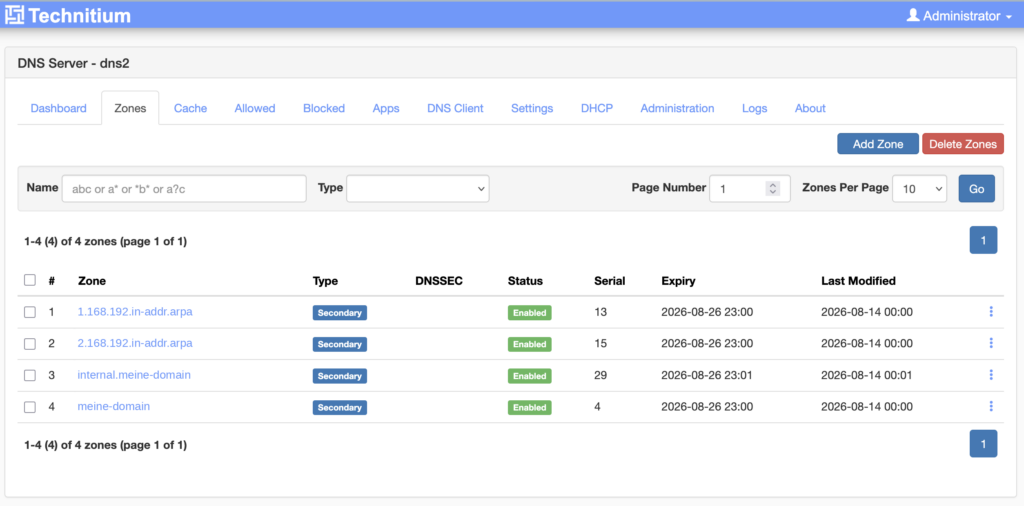
It only came up because before the DHCP step I checked whether the new server gives the right answers. Not whether it answers. Whether it answers correctly.
Between „created“ and „rolled out to the clients“ there has to be a check: compare the SOA serials of both servers and resolve a few internal names against the new server. Only when both are right may it go into DHCP.
What zone transfer does not carry
A zone transfer replicates zone data. Nothing else. Everything under „Settings“ is per server:
- block list URLs
- allowed zones, meaning the exceptions
- the blocking type (NXDOMAIN,
0.0.0.0or a custom IP) - recursion policy and forwarders
- web interface users and the SSO configuration
In everyday terms: every blocking change has to be made on both servers. Forget it once and you get that „works sometimes, not others“ pattern again, depending on which resolver the device asks. That is exactly what came up during the build: the primary had a block list, the new secondary did not. So: added, and verified against a known ad domain.
Which leads to a question that has come up more than once around here (mostly from my girlfriend):
How do I get onto a blocked site quickly?
Technitium offers three ways, and all three have to be done on both servers:
- Allow a single domain permanently. Click „Allow“ in the query log and the domain lands in allowed zones.
- Disable blocking temporarily. Settings → Blocking → Temporarily Disable Blocking, enter the minutes, it switches itself back on. And, my favourite:
- One tap from the phone. There is no Technitium app, but the endpoint behind it is a simple HTTP GET. An iOS shortcut on the home screen does exactly what the AdGuard Home app used to do: two URLs, one per server, in a single shortcut. A second shortcut with
minutes=0arms it again immediately. Tested, works, and surprisingly well at that. One caveat: the token this needs has admin rights. Whether you want that on your phone is worth one deliberate decision.
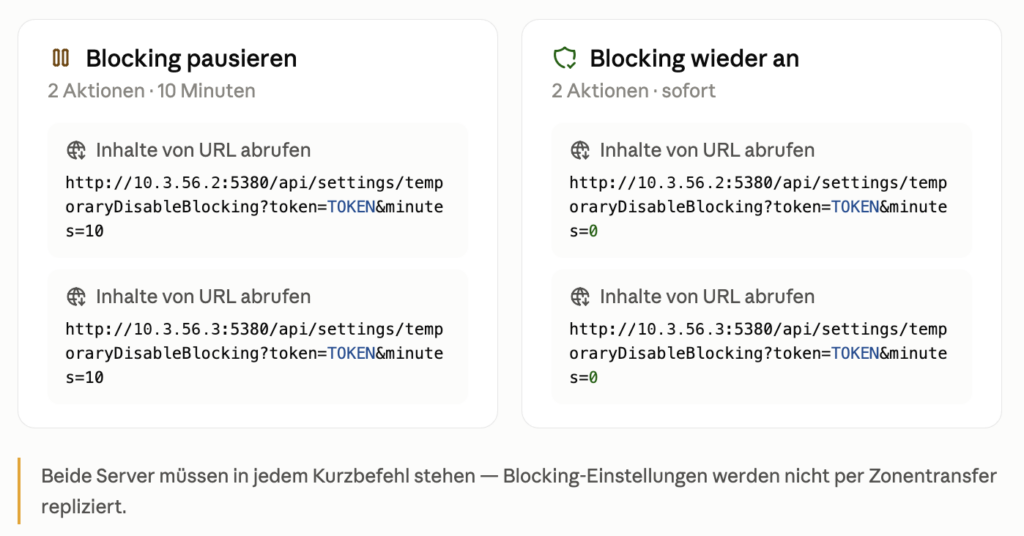
The right one arms blocking again immediately.
Technitium now also has a clustering feature that syncs exactly this configuration across several instances, meaning the part zone transfer leaves behind. That is the obvious answer to this whole section. Someone on the Fediverse pointed me at it: he runs Technitium as a cluster of two nodes and can update one node without trouble. My reply at the time was that I would definitely do that too. I have not built it to this day, and I did not test it for this post either. Something to look at properly when I get around to it.
His argument was a different one from mine above, and in hindsight the better one: he is not after saving himself the duplicated block list maintenance, he wants to update one node without anyone noticing. Which is precisely the case I set up the secondary for in the first place. During the build I simply did not have it on my radar any more. 🤦
Reachable is not the same as correct
The obvious monitor asks: is the second DNS server answering? That one is necessary, but it is not enough.
The more dangerous case is the silent replication stop. The secondary runs, answers promptly, looks perfectly healthy, and serves stale data while doing so. With full authority, of course. A reachability monitor stays green throughout, because reachable it certainly is.
So there is a second monitor that asks the question that actually matters: do the SOA serials of primary and secondary match? Implemented as a small script that asks both servers per zone via dig and only gives the all-clear on a complete match. Every 15 minutes via cron, result to the monitoring instance.
This carries beyond DNS, and it is essentially the same lesson as the trap above:
A service that answers is not the same as a service that is right.
What a second DNS does not do
To avoid the wrong impression: DNS redundancy is slow and outside my control.
There is no mechanism that actively switches clients over. Every device decides for itself when to try the second entry. Many only after a timeout, some cache the order, and a few devices (IoT junk and smart TVs, typically) stay on the first server until they are rebooted (!). So a second DNS makes an outage milder, but not invisible. For my actual purpose, planned maintenance on the primary, that is entirely sufficient. For the goal „nobody notices the outage“ it is not.
The answer to that would be a shared virtual IP via VRRP, in practice usually keepalived. Clients then only get one address, and it moves between the servers. If the master fails, the backup takes over the IP within one to three seconds, invisible to clients because the same address keeps answering.
I deliberately did not build it, even though I do enjoy playing with this sort of thing:
- Both DNS containers run unprivileged. keepalived needs the rights to set IP addresses and to send raw VRRP packets, and those are missing there by default.
- Without a proper health check, a container with a dead DNS service happily holds the virtual IP and routes everything into the void. So the check has to test the service, not the host.
- On a network partition both hold the IP. Split brain, of all places on DNS.
- And the fundamental point: the high availability layer itself becomes a component that can take down the most critical service in the house. In my experience that layer is the most common cause of failure in HA setups.
There is a clear trigger that would make me reassess: if during the next real outage it turns out that certain devices do not switch over at all. At that point it stops being a speed problem and becomes a functional one, and a virtual IP would be the right answer. Not before.
The same goes for catalog zones, which I mentioned in the original post: they save you from creating new zones on every server individually. With my four zones the effort does not pay off.
Conclusion
Where things stand after the rebuild:
- Four zones replicate, the serials match.
- Internal names, services behind the reverse proxy and reverse lookups return the same answers against the secondary as against the primary.
- External names are resolved by the secondary recursively on its own. Deliberately no forwarder pointing at the primary, otherwise the secondary would fail together with the primary and I could have saved myself the whole exercise.
- NOTIFY verified live, test record replicated after 12 seconds.
- Blocking identical on both servers.
- Two monitors: reachability and serial agreement.
One closing point that briefly threw me: the new container needs no backup. A secondary holds no state of its own, it can be reproduced from the primary at any time. What needs securing is not the container but the knowledge, and here that is exactly two things: the name of the TSIG key and its secret. Both live in the password manager, not in the backup volume.
Learning:
A secondary that does not replicate is worse than none at all: it is a second resolver handing out wrong answers with full authority. Redundancy only becomes redundancy once you have verified that the second instance says the same thing as the first, and not merely that it answers at all.
The post this one follows on from: Technitium in the Homelab: Taking DNS into Your Own Hands.
This post was originally published in German on 20 August 2026.
The original post can be found here: Jetzt wird’s redundant: Secondary DNS im Homelab.