
On Wednesday evening I actually just wanted to take a quick look at “what’s new on YouTube”. Then I stumbled over the video “Why Some People Are Obsessed With Proxmox (It Started With One VM)” by DevPsyche, and I couldn’t stop laughing. It just hits so precisely that it almost hurts.
Maybe a bit toooo niche, admittedly. If you don’t have a Proxmox box in your basement, you’ll probably tune out quickly. But hey – the target audience of this blog is rather narrow anyway…
Watch first, then read on.
The video counts clicks on the one popup every Proxmox user without a subscription knows: “You do not have a valid subscription for this server.”
Click 1 is the first VM on a retired desktop PC. Click 3000 is a meeting at work where someone asks whether anyone has ever heard of Proxmox…
In between, small detours into psychology: why snapshots make you brave, why you need something that needs you. And then the point where, after last week, I can completely relate: a power outage at 1:12 a.m., after which one node doesn’t come back up.
How often I clicked that popup away, I don’t remember anymore. I only remember that back then I wanted to get rid of it with a sed one-liner from my own setup guide. The one-liner was a bit too greedy, it shredded proxmoxlib.js, and I had a white web UI on both hosts – oops. Fixed with apt install --reinstall proxmox-widget-toolkit, then ran the community scripts’ post-pve-install.sh on top, which turned out to be the cleaner solution after all.
Since this year, both hosts additionally run my own pve-remove-nag.sh with a DPkg hook, versioned in my host-scripts repo so it survives every update. So I don’t see the popup at all anymore – which means my counter has stopped…
What follows is my hit list for the video:
Click one: VM 100

In the video, the first VM is Home Assistant – just to see what happens. 20 minutes later the hallway light comes on because a computer “that didn’t exist this morning” wanted it to.
My first VM was Home Assistant too – just not on Proxmox. HA ran for years as a VM in the Virtual Machine Manager on my Synology. Proxmox itself had no VM at all for months, only LXCs. But the first real VM there was indeed Home Assistant (number 1006). By default, Proxmox starts counting at 100 – I start at 1000, though. More on that in a moment.
The counterpart to the video scene is my office (home office): when I enter it for the first time in the morning, the external blinds go up and the ceiling light comes on. Before, I did that myself every morning with a push button, about ten seconds after the presence sensor in the hallway had spotted me.
So the automation has taken ten seconds a day off my hands – just imagine the lifetime that saves if you do the math :-). Hit.
Click forty: The containers

Direct hit: for me it started on the NAS, the very first Docker container was Home Assistant or Paperless-ngx, I don’t remember exactly. Proxmox recommends putting Docker into a proper VM – like in the video, I ignored that, of course.
I run Docker in LXCs. Nine of them on one server, two on another, managed via Komodo. Around 45 stacks in total and considerably more containers. The video describes it as a container whose only job is to host another kind of container. You know how that sounds, you’ve just decided not to think about it. Exactly 🙂
I knew the story behind tteck’s helper scripts. Still, I’ve never used the scripts for new LXCs, VMs or programs, all my containers are built by hand with pct create. The post-pve-install.sh mentioned in the video, however, did run on both hosts. So yes: here too, a stranger helped me.
Click 200: The snapshot

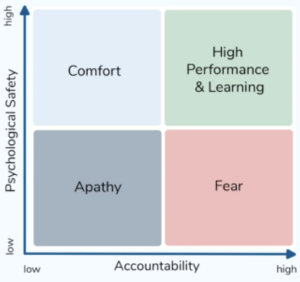
A short detour into psychology here. It’s about Amy Edmondson and her study with hospital teams from the nineties: the best teams seemed to make the most medication errors. In fact, they just reported more, because nobody was afraid to admit mistakes. Keyword: psychological safety.
In the homelab, the snapshot button is the technical counterpart. You dare to do things because “back” only takes 30 seconds. At the office, unfortunately, there are usually no snapshots, just a postmortem meeting…
Fitting: at my employer Trusted Shops I took part in a leadership training this very week, and on Tuesday evening shortly before midnight I was sitting at the e-learning chapter in which exactly this study appears. On Wednesday morning the live session on it, seven team leads, external trainer, topic psychological safety and error culture. Wednesday evening the video.
The model is a two-by-two matrix, psychological safety on one axis, accountability on the other. Applied to the basement: snapshot taken, rollback works, so nothing can really have consequences. In relation to the basement, the accountability axis then reads: “the rest of the family notices”. More on that in a moment.
By the way, I’ve only rarely had rollback rescue cases. What I do have: ZFS snapshots before every host upgrade and restore tests from Proxmox Backup Server under a throwaway number that gets deleted afterwards.
And of course I know my wearout values too: just 2 percent on the two SSDs in the current “main host”, 0 percent (!) on the system drive, but already 11 percent on the SSD in my staging host (which used to be my main host). It isn’t older than the two Crucials, all three are at around 3,500 to 3,700 operating hours. It’s just the OEM drive the whole host runs on, and the dashboard gives it a good three years to go.
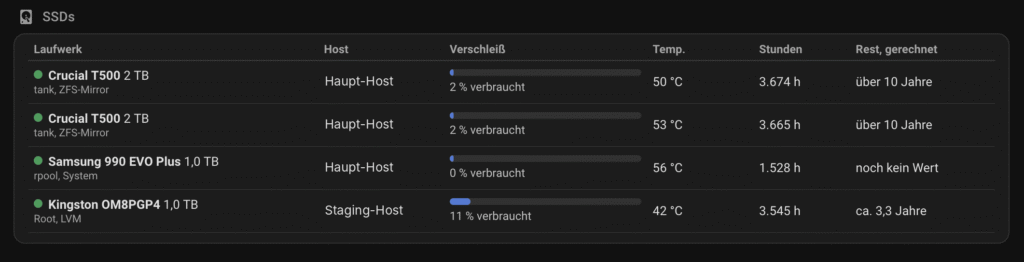
The values are delivered to me by the Proxmox integration in Home Assistant. So: a clear hit.
Click 400: The second node
I have two nodes as well, but they don’t run as a cluster. Not yet…
My main node is a Minisforum MS-01, its predecessor and current second node a GEEKOM XT12 Pro. The idea wasn’t quorum, it was a hardware replacement with a rollback reserve: move everything over, keep the old host around as a fallback for a while. Since then it has become the staging node and the second DNS location.
Nicely put in the video: you buy a second machine for redundancy, and it then needs the permission of a third one to start at all. That is actually the/a reason why I haven’t tackled this so far.
To prepare for a cluster solution, though, I did take one precaution in the form of a numbering convention: the LXCs on the main node get 1xxx, on the second node 2xxx, globally unique. The reason I wrote down for myself back then: if the two ever become a cluster, the IDs have to be unique.
That mine starts at 1000 was already the case before, the convention just gave it a reason after the fact. And that’s why “yet” is the most dangerous word in this section. It’s guaranteed to happen ;-). I’d say: half a hit.
Click 900: Home Prod

In the video it’s the ad blocker that, from a certain point on, must never go down again. Runs here too, of course, but for me it’s more the DNS. Technitium, primary on the main node, secondary on the second node, and if you read along here you know that in August I set up the second DNS server for exactly that reason. Hit.
According to the video: the homelab becomes home prod. Labs are allowed to break, prod isn’t. And “the voice from upstairs” asking whether the internet is broken (in a tone that reveals they know who’s to blame). That question comes up here too. I’ll say no more. 🙈
The router (VM 117 in the video) isn’t virtualized here yet. Then again, it’s not the provider’s default box either – it’s a UDM Pro from Ubiquiti. You have to draw the line somewhere.
Regarding the reference to the houseplant experiment from 1976 (nursing home in Connecticut, one floor gets plants to water themselves, the other gets plants the staff waters. The people something depended on were more alert, more active, happier, even a year and a half later.):
My plant has two Proxmox hosts, three NAS systems and quite a few other offshoots.
Click 1600: Passthrough and the chatbot

GPU passthrough runs here too (for Plex transcoding – hit), but the unspectacular variant: Intel iGPU passed through to the privileged LXC via /dev/dri, with lxc.cgroup2.devices.allow and lxc.mount.entry. No VFIO, no IOMMU weekend (more like an afternoon with group IDs…).
After moving the nodes, the devices line was promptly missing from the compose file, and Plex quietly transcoded on the CPU until I noticed at some point (there is now a monitor for that, of course).
The punchline after that still lands: you build all of this to understand how it works – and in the end a chatbot operates the cluster while you sit next to it.
That works similarly for me – an LLM gets onto its own LXC via an exec bridge and from there it can submit compose changes as pull requests, assess Renovate PRs, push the documentation into my Git repo and send me a status mail with a traffic-light rating early on Saturday mornings. Hit. It also built the systemd service that was missing after the power outage (more on that in a moment). I only nodded it through.
The question about CT 109, the container that neither the chatbot nor you yourself can place anymore (not opened for months and kept anyway): I had two candidates as well. Both stopped, last seen in May (!). In August I finally dared and deleted them…
What I have instead: 56 GB of app data on the old node from before the migration. Backups for containers that no longer exist, dutifully synced to the NAS every night via cron.
Status in the todo list: analysis before deletion, open. Since August. So my “CT 109” is no longer a container, I’m only backing up its estate…
Click 3000: The meeting
No hit here: no VMware renewal lands on my desk at work, I sit in Finance Operations, not in office IT.
But the thought of missing the popup on the company servers with a subscription, that I can immediately relate to. I’ve weaned myself off it at home with a hook, see above. Maybe that was a mistake.
1:52 a.m.
Now to the week of coincidences.
On 22 October, around noon, the power was out here in Mettmann for just under three quarters of an hour. When it came back, almost everything came back up: fridge, Wi-Fi, doorbell.
What did not come back up: my Proxmox nodes, my NAS, the Mac mini in the office. And with them, the two DNS resolvers. The house had internet, but no name resolution (which at home, for everyone except me, is the same thing).
The hosts only came back when I pressed the power button by hand in the afternoon, a good two hours after the power returned. If nobody had been home, the network would not have come back up on its own. A secondary DNS on a second host doesn’t help much when both hosts hang off the same PDU and both stay off once the power is back.
Two LXCs didn’t start afterwards either, because their NFS mounts came from the NAS, which booted more slowly than the hosts. Hence the systemd service from above, which now waits for the NAS before starting.
On the evening of 27 October I was then standing in the basement with a monitor and a USB keyboard.
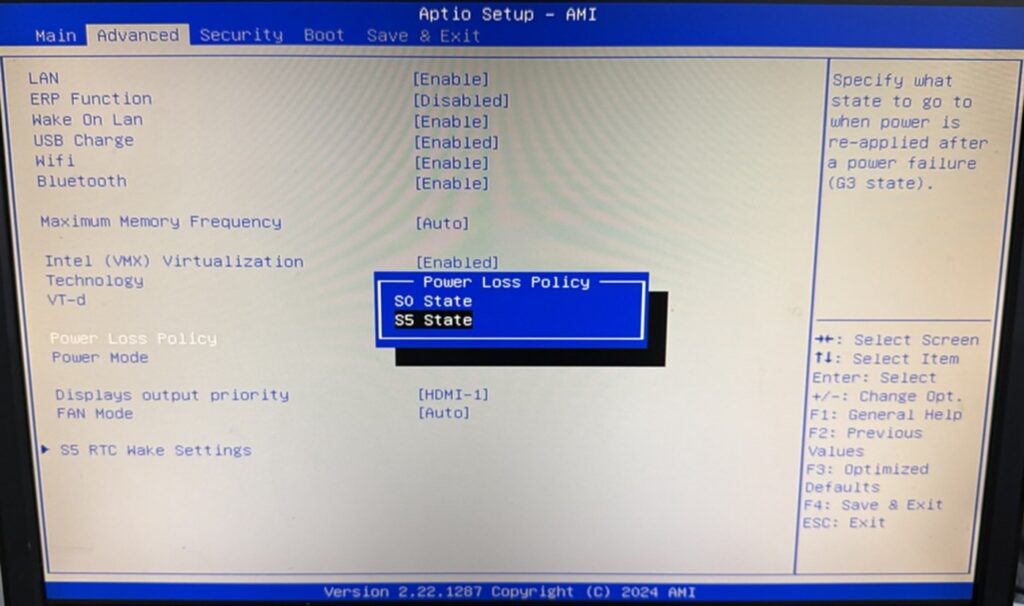
- The MS-01: Advanced, ACPI Settings, “Restore On AC Power Loss” from Always Off to Always On.
- The GEEKOM: Advanced, “Power Loss Policy” from S5 State to S0 State. Deliberately not “Last State”, because since that same day the rack has been on a UPS, and behind a UPS the last state before the blackout is “shut down cleanly”. Last State would therefore mean: stays off.
I upgraded with two CyberPower units for just under 700 euros in total, NUT server on the main Synology, the hosts as clients. At that price, by the way, “the voice from upstairs” sees no point in a UPS. The fact that I had warned beforehand that otherwise Wi-Fi, doorbell and cameras would be gone during a power outage unfortunately didn’t improve my position.
The video is from 27 October. Its complete resolution, which I won’t spoil here, is a BIOS setting that controls whether a machine turns itself back on after a power outage.
I changed it on the day the video went online, without knowing the video. That same evening the e-learning on Edmondson, the next morning the live session, the evening after that the video. All very fitting.
Whether the BIOS setting really does what it should, no real power outage has proven yet. But I’ll deliberately test that myself in the next few days…
The end of the video:
Everywhere else you’re a user. Down here you’re the one who decides what boots.
That’s now literally what it says in my BIOS. 😀
Which leaves the question: What’s your “CT 109”?
Image credit: Walter White by Winston Born / freepngimg.com, license CC BY-NC 4.0
This post was originally published in German on 29 October 2026.
The original post can be found here: I am the one who boots.