
Two UPS units, one shutdown chain and a long test all the way down to “battery low”. And the question of what actually comes back on when the power returns.
On 22 October, the power was out here in Mettmann for just under three quarters of an hour. What did not come back up afterwards, I already wrote about in I am the one who boots.
In short: both Proxmox hosts, both NAS and with them both DNS resolvers and Home Assistant stayed off until I pressed the power button by hand a good two hours later.
A UPS had been sitting on my board for quite a few months. With low priority…
On the afternoon of the 22nd, the card suddenly had a high one…
…and by the evening, two units were ordered.
What a UPS should do here
Bridging a 43-minute outage with everything running isn’t possible with affordable hardware. And I’d probably get into trouble here if I put a diesel generator in the basement.
The network rack draws around 265 watts, the second NAS in the heating room another 106 or so. So the goal was a different one:
- Short outages go unnoticed.
- Long outages end in a clean shutdown instead of a hard power cut.
- When the power comes back, everything starts without anyone lifting a finger.
The last point is exactly what was missing on the 22nd. And a UPS alone doesn’t solve that, by the way, quite the opposite. More on that below.
Two locations, two units
My homelab lives in two places in the basement. In the utility room, the network rack with both Proxmox hosts, the main NAS, router and switches, which also power Wi-Fi, cameras and doorbell via PoE.
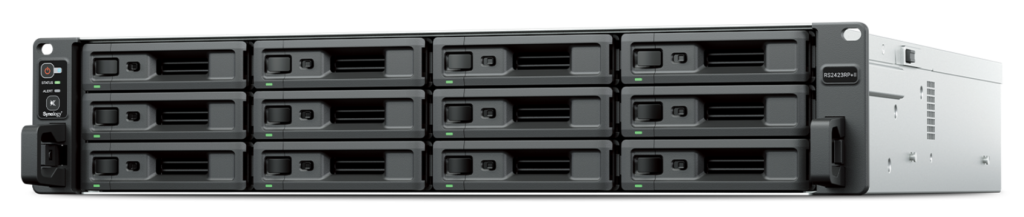
The heating room is home to the second NAS, an RS2423+. It’s 552 mm deep and simply doesn’t fit into my rack with its 500 mm mounting depth.
That left two options:
- New rack: insulated, 25U, everything in it, plus a 19-inch UPS. The nicer solution and actually my favourite. But around €2,200 and a rack weighing a good 80 kg that would first have to make it down a narrow staircase into the basement. Shelved.
- Two UPS units: one per location, the same model twice. One battery type, one interface, one configuration. It ended up being the CyberPower CP1600EPFCLCD, line-interactive with pure sine wave, 1,000 watts, for €688 in total.
Small catch: on Synology’s compatibility list, the CP1600 is only listed for the smaller NAS, the RS2423+ is missing. The smaller CP1500 would have been listed for both. I still went with two 1600s and connected the rackstation first, while the 14-day return window was still open. DSM recognised it right away, too.
Waiting for Black Friday might have saved another 30 euros per unit. After the 22nd, that wasn’t worth it to me…
The “rest of the family”, by the way, sees no point at all in a UPS at that price (let alone several). My argument that otherwise Wi-Fi, doorbell and cameras are gone with every power outage didn’t change that either. That they’ll be offline for exactly that reason during the tests doesn’t make things any better 😀
The shutdown chain
Each UPS is connected via USB to “its” NAS. On both NAS, DSM also acts as a NUT server, i.e. the service that makes the UPS status available on the network. The two Proxmox hosts are NUT clients of the main NAS in the utility room, and Home Assistant reads both UPS units via the NUT integration.
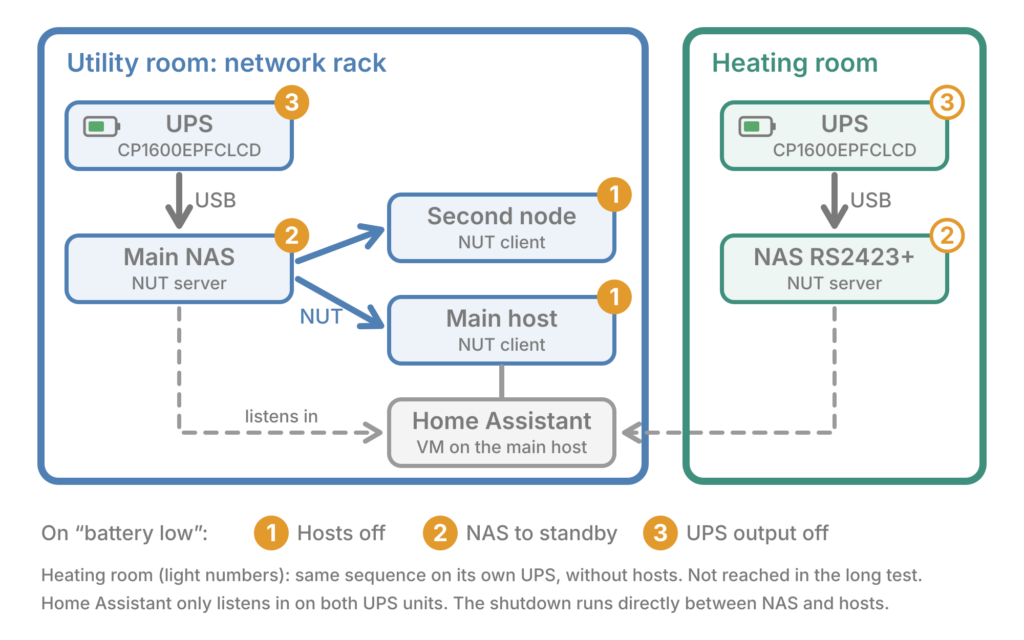
Home Assistant only listens in, the actual shutdown runs directly between NAS and hosts.
When the battery in the utility room runs low, the NAS gives the signal, both hosts shut down, then the NAS itself goes into standby, and finally the UPS switches off its output. When the power comes back, the UPS switches its output back on, and everything boots up.
The order more or less sorts itself out: the main host has shares mounted from the NAS in the heating room, which, according to the estimate, lasts around an hour on its own UPS. The utility room, with its much higher load, gets around 17 minutes until “battery low”.
So if the whole house loses power, the utility room always goes down first. Good.
The timer trap
The first version of the shutdown logic from the 22nd looked different: shut down the main host after just two minutes on battery, so that Wi-Fi, doorbell and cameras last longer. Sounds reasonable at first.
Except: the plan assumed that Home Assistant runs on the NAS. That hasn’t been true since September, HA is now a VM on exactly that host. And the first version hadn’t considered DNS either.
So after two minutes, exactly what was missing on the 22nd would have been gone: name resolution and home automation. We’d only just had Wi-Fi without DNS…
That’s why it ended up being the simpler option: no timer. Everything keeps running until the battery is low, then everything shuts down in an orderly fashion. The two-minute variant would have bought roughly five to eight more minutes of network, but without HA. Not worth it.
Nice side effect: on short outages, nothing shuts down at all. So the case “power is back, but the hosts are off” no longer exists either, and I don’t need Wake-on-LAN.
Restart without lifting a finger
For everything to start on its own after a long outage, three things have to be right. The first two are already covered in the last post, so just briefly here:
- BIOS: Both hosts are now set to “power on when power returns”. Deliberately not to “last state”, because behind a UPS the last state is “cleanly shut down”. So the hosts would stay nicely off 😉
- NAS: In DSM, automatic restart after a power failure is enabled on both NAS.
- Boot order: On the 22nd, two containers didn’t start because their shares came from the NAS and the NAS booted more slowly than the host. Since then, a small systemd service waits for the NAS shares before Proxmox starts the guests.
The service passed its first real cold start during installation on the 27th: waited 40 seconds, then all nine containers came up, including the two that had got stuck on the 22nd.
The dashboard
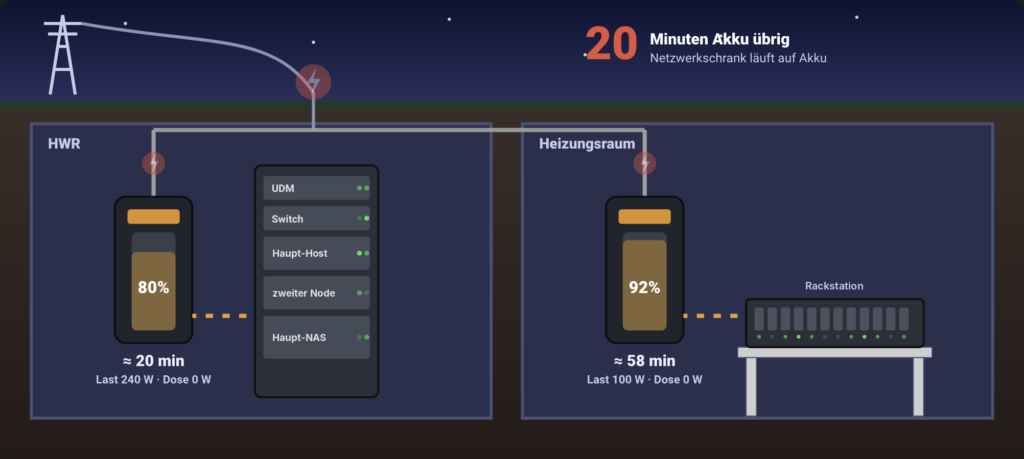
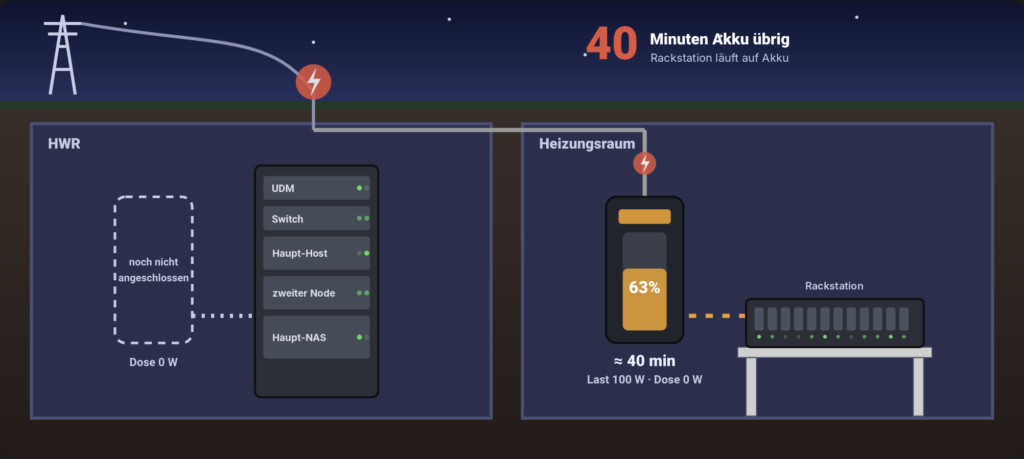
Home Assistant now has its own UPS view: a cross-section of the house with both rooms, the power lines and the remaining minutes as a big number, with tiles, history and logbook below. Plus a push notification to my phone when a UPS goes on battery, when the battery runs low and when the power is back.
Short test
Fortunately, you don’t have to wait for a power outage. There’s a Shelly smart plug in front of each UPS anyway, measuring consumption.
Shelly off means, for the UPS: power gone.
| Heating room | Utility room | |
|---|---|---|
| Shelly off | 20:24:00 | 20:25:51 |
| HA sees “on battery” | 20:24:06 | 20:25:59 |
| Shelly on | 20:24:31 | 20:26:09 |
| HA sees “mains” | 20:25:06 | 20:26:59 |
Four push notifications arrived, nothing shut down. Exactly as it should be.
One thing stood out, though: HA only polls the UPS once a minute. So “power back” can arrive up to a minute late, and an outage shorter than a minute may not show up in HA at all.
For the shutdown itself, that doesn’t matter, it runs directly between NAS and hosts.
Long test
The plan was actually two separate runs, first the heating room, then the utility room. On the evening of 3 November, I decided to do both at once after all. In a real power outage, it’s the whole house, not just one room.
Preparation: a maintenance window in Uptime Kuma across all monitors, so that my phone doesn’t report every second what’s gone. And bugging the family. Nobody was thrilled, see above 😀
That left one question: how does the power actually come back? After “battery low” in the utility room, Wi-Fi and internet are gone, and with them Home Assistant and the Shelly cloud. So switching back on via the app won’t work. I solved that with an auto-on timer directly in both Shellys: 2,100 seconds after switching off, they turn themselves back on, i.e. after 35 minutes.
At 22:39, I switched off both Shellys via Home Assistant. The times below come from the HA history and the journals of the hosts and containers. Since HA only polls the UPS units once a minute, everything from that source is accurate to about a minute.
| Time | What happens |
|---|---|
| 22:39:20 | both Shellys off |
| 22:39:37 | utility room on battery, first announcement |
| 22:54:37 | second announcement, UPS says just under 7 minutes left |
| 22:55:37 | last value from the utility room: 20% battery, 283 seconds left |
| 22:56:23 | the first VMs and containers shut down |
| 22:56:45 | second node off |
| 22:58:32 | main host off |
| 23:14:19 | Shellys turn themselves back on |
| 23:14:40 | main NAS boots, a few seconds later both hosts |
| 23:20:09 | all twelve VMs and containers running again |
What came out of it
- Utility room: “Battery low” after around 16 minutes, the projection was 17. So that fits pretty well. The UPS was running at 22 to 24% load. Its own runtime estimate, on the other hand, is more of a “rough idea” than a measurement: within a few minutes, it jumped from 937 to 991 and then to 515 seconds.
- Shutdown chain: The main NAS shut down both hosts via NUT, all twelve VMs and containers were stopped cleanly, both hosts powered off normally. What happened in the rack after that, I don’t know exactly. When the UPS switched off its output and what network and NAS still draw without the hosts, I can’t measure. The NUT server lives on the NAS and is gone along with it.
- Restart: Completely hands-off. Just under six minutes after the Shellys switched back on, everything was running again. BIOS setting, DSM restart and wait service did exactly what they’re there for. Not a single monitor in Uptime Kuma went red because of the test.
- Small curiosity: After the cold start, the utility room UPS reported 59% charge. Right before the shutdown it was 20%, and nothing charged in the quarter of an hour in between. I just ignored that value…
- Heating room: The rackstation never reached “battery low”, the power was back after 35 minutes. The battery dropped from 100 to 63% in the first 17 minutes, with 35% left when the power returned. Extrapolated, at this load it would have been over after around 50 minutes, so “battery low” more like after three quarters of an hour rather than the estimated hour. For an outage like the one on the 22nd, that probably would have just about been enough. Whether it then also goes into standby cleanly still needs a separate run to show. And whether it shouldn’t shut down earlier anyway once everything in the utility room is off… I’m still undecided on that.
New addition: announcements
For the long test, I also built two announcements via the Sonos speakers. Anyone in the house should know that the power is out and the Wi-Fi only has limited time left. A push notification only reaches me, after all.
- As soon as the utility room goes on battery: “Attention, power outage. Internet, Wi-Fi and servers are now running on battery, about x minutes left.”
- When the remaining runtime drops below seven minutes: a notice that servers and network will shut down in about two minutes.
Both came through during the test. The second one, however, only about a minute before everything went off, the jumping runtime estimate sends its regards. So the threshold needs to be set a bit earlier. On top of that, the first announcement should repeat every five minutes, and there’ll be an all-clear when the power is back.
Oh, and – something to keep in mind: during the test, the speakers had normal power, since only the Shellys in front of the UPS units were off. In a real power outage, the Sonos are just as gone as everything else that isn’t connected to a UPS 😉
The false alarm
One notification didn’t fit at all, though. Right at the moment the main NAS shut down, my phone got: “UPS utility room: power back – mains restored. Battery unavailable %”. Of course the power wasn’t back.
The helper sensor binary_sensor.usv_hwr_auf_akku, which the push automation is attached to, falls to off instead of unavailable when the NUT connection is lost. And the automation reads the change from “on battery” to “off” as “mains is back”. Fittingly, the dashboard showed “not connected yet, outlet 0 W”. Technically sort of correct… It’ll be fixed along with the announcements.
What remains
The most expensive part was the hardware, but most of the work went into the question of what goes off and comes back on in which order. Without the BIOS setting and the wait service, the UPS on the 22nd would only have made sure that everything goes off a quarter of an hour later and then stays off just the same.
The long test showed that the chain holds up now. Still open: the run in the heating room, the announcements and the false alarm.
Learning:
A UPS only postpones the outage.
Whether everything comes back up afterwards is decided by BIOS, NAS and boot order.
Image credit: storm lantern by Winston Born / freepngimg.com, license CC BY-NC 4.0.
This post was originally published in German on 12 November 2026.
The original post can be found here: USV fürs Homelab: Wer bleibt an, wenn der Strom geht?